




By Oleksii Polyakov
A Gorilla login starts from the "Sign in" button at the top of the site. The identifier is a phone number, an e-mail address, an account number or a Google profile, followed by the password. After a successful authorisation the personal account opens: balance, deposits and withdrawals, payment history, promotions and verification status. Below are the mechanics of signing in, the usual failures, password resetting, session control and protecting the profile from strangers.
The Gorilla platform works within the Ukrainian licensing regime: play is allowed from the age of 21, and the cashier opens only after identity verification. Confirmation through the Diia app or BankID takes a few minutes, so access to the account and to payment operations appears almost immediately after registration.
This material is informational and is not an encouragement to gamble. Gambling carries financial risk and is available to people aged 21 and over.
| Parameter | Value |
|---|---|
| Login identifiers | Phone number, e-mail, account number, Google profile |
| Minimum password length | 8 characters, mixed case and digits |
| When verification is required | Before the first deposit and any withdrawal |
| Ways to confirm identity | Diia, uploading documents, video verification via webcam |
| Documents | ID card, internal or international passport, residence permit |
| Speed via Diia / BankID | A few minutes |
Authorisation at Gorilla casino
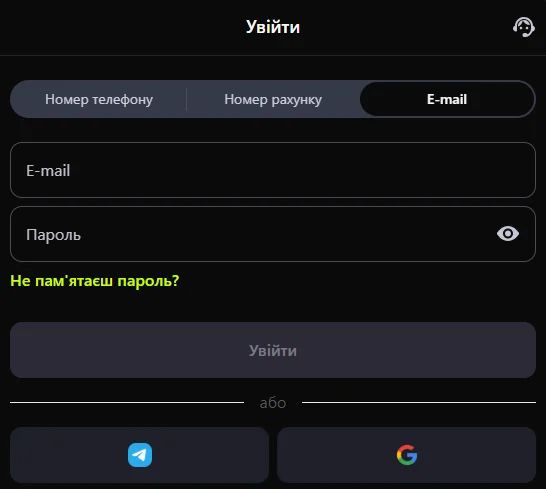
The login form is identical in the browser and in the mobile version: Gorilla casino uses one profile for the site and the app, so signing in does not depend on the device — a login from a phone and a login from a computer need exactly the same data.
Signing in by number or e-mail
- Open the Gorilla site and press "Sign in".
- Choose the method: sign in by phone number, by e-mail address or by account number.
- Enter the password created at registration (8 characters or more).
- Use the Google sign-in if the profile was created that way.
- Wait for the Gorilla account to load with the current balance.
Signing in from a new device
The first launch from an unfamiliar browser comes with a login confirmation: a code by SMS or a letter to your e-mail. Gorilla records the IP address and device parameters, so a sharp change of location may make the system ask for authorisation again.
| Device | Access specifics |
|---|---|
| Desktop browser | Full functionality, the session is kept until sign-out or inactivity |
| Mobile browser | Adaptive interface with no separate installation |
| App | Sign-in through the Gorilla app after a one-off confirmation |
| New device | A code or a confirmation letter before access |
Sign-in errors on the Gorilla platform

A "cannot sign in" situation almost always comes down to four causes: a wrong password, unfinished verification, self-restriction or a blocked account. An authorisation error mentioning restricted access means a check against the Register of persons barred from gambling.
The password is not accepted
The password is case-sensitive, so Caps Lock and the wrong keyboard layout are the main sources of failure. After several unsuccessful attempts the Gorilla platform temporarily limits the form; a pause before the next attempt lifts the restriction.
The login form takes a long time to load
Trouble signing in to Gorilla because the form loads "forever" is usually caused by an overfilled cache, an active VPN or extensions that block scripts.
| Symptom | Action |
|---|---|
| The form does not open | Clear the cache, turn off the VPN and blockers |
| "Wrong login or password" | Reset the password through your contact details |
| The confirmation code does not arrive | Check spam and whether the number is current |
| A message about a restriction | Contact Gorilla support before depositing |
Password recovery at Gorilla online casino
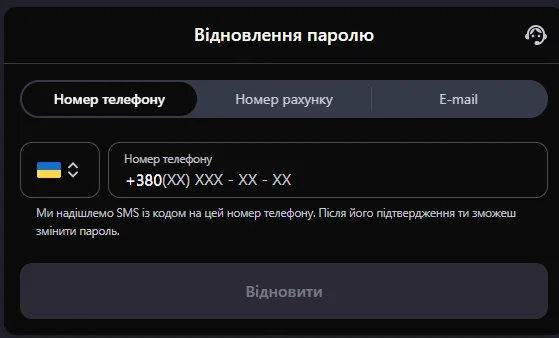
The "Forgot your password" option sits under the login fields. The casino sends a link or a code to the contact given at registration with Gorilla — which is exactly why a current e-mail address and phone number are critical for keeping access.
Resetting through your contact details
- Press "Forgot your password" in the form.
- Give the e-mail address or phone number from the profile.
- Receive the code or link and follow it.
- Set a new password of at least 8 characters.
- Sign in to Gorilla with the updated details and check the balance.
The code or letter does not arrive
- check the "Spam" and "Promotions" folders;
- make sure the address matches the one registered with Gorilla;
- wait 2-3 minutes before requesting again;
- check roaming and the SIM balance for SMS;
- contact Gorilla support chat if access to the account was lost together with the mailbox.
Sessions and devices at Gorilla
A session is an active sign-in to Gorilla casino from a particular device. Gorilla allows a phone and a computer to work in parallel, but every new connection is confirmed separately, and the log keeps the history of connections.
Automatic end of a session
Long inactivity breaks the session — that is protection against strangers on a shared device. A new sign-in is then needed; bets and rounds are recorded on the provider's side, so the Gorilla platform does not lose the results of play.
The list of active sign-ins
- the list of devices and browsers the Gorilla profile has used;
- the time of the last activity;
- the IP address and region of the connection;
- ending every session with one click;
- changing the password with a forced sign-out on the remaining devices.
Protecting the profile at Gorilla casino
A safe sign-in to Gorilla rests on three things: a password not reused in other services, a protected mailbox and limits in the account. Responsible gaming tools — restrictions on deposits and time — reduce not only financial but also behavioural risk.
Signs of a fake login form
- the domain differs from the official one by a character or by the domain zone;
- HTTPS and a certificate are missing;
- a card number or CVV is requested at the login stage;
- a bonus is promised for "confirming your details";
- a shortened link in an SMS or a messenger.
What to do after a suspicious authorisation
- Change the password and end every session.
- Check the payment history in your account.
- Update the password of your e-mail box.
- Write to support with the time and details of the incident.
- If needed, switch on self-restriction until the matter is cleared up.
FAQ
Short answers to the questions that come up most often when access is lost.
How do I sign in to Gorilla if my phone number has changed?
Use the e-mail address, the account number or the Google profile — these are alternative identifiers of the same account. To sign in with a new number, update the contact in the "Personal details" section or send a request to support with confirmed documents.
Why does the account sign itself out?
The reasons: a session ended by inactivity, cookies cleared by the browser, a changed IP address or network, and sessions ended manually after a password change. Gorilla may also break the connection when a VPN substitutes the region.
How long should I wait for the password reset letter?
The Gorilla platform sends the letter or SMS within a few minutes. If there is no message after 10 minutes, check spam, check that the address is correct and repeat the request once — frequent attempts make processing slower.
What should I do if I suspect someone else signed in?
Change the password immediately, end all active sessions and go through the payment history. Then write to casino support: operations may be frozen temporarily until the check is done. Limits and self-restriction at Gorilla will help keep the risk under control afterwards.
This text was prepared for information and is not an advertisement or a call to take part in gambling. Play only with your own money, from the age of 21; if control slips, use help services and self-restriction.